PcComponentes
Mijn account
producto
  • KVM Switch Startech 2 Poorten DisplayPort 4K 60Hz USB Audio
    • KVM Switch Startech 2 Poorten DisplayPort 4K 60Hz USB Audio
    • KVM Switch Startech 2 Poorten DisplayPort 4K 60Hz USB Audio
    • KVM Switch Startech 2 Poorten DisplayPort 4K 60Hz USB Audio
    • KVM Switch Startech 2 Poorten DisplayPort 4K 60Hz USB Audio
    Afbeeldingen laden ...
    P/N: SV231DPDDUA2Artikelcode: 229689
    StartechKVM-switches en kabels Startech

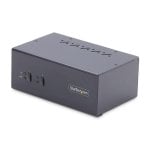
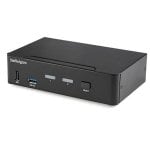
    KVM Switch Startech 2 Poorten DisplayPort 4K 60Hz USB Audio

    587,00€
    P/N: SV231DPDDUA2Artikelcode: 229689
    StartechKVM-switches en kabels Startech
    Belangrijkste punten
    • Ondersteunt 2 computers met dubbele 4K DisplayPort
    • USB-hub voor randapparatuur delen
    • Audio- en microfooningangen voor multimedia
    • Snel schakelen via knop of sneltoets
    • Compatibel met Windows, macOS en Linux
    • Compact ontwerp met LED-indicatoren
    587,00€
    Vergelijkbare artikelen
    587,00€
    Kenmerken
    Reviews20
    Vragen en antwoorden0
    Over het product

    Maximaliseer je productiviteit en multimedia-ervaring met de Startech KVM Switch 2 Poorten DisplayPort 4K 60Hz. Wissel moeiteloos tussen twee krachtige systemen met dubbele monitorondersteuning en behoud perfecte beeldkwaliteit en randapparaatcontrole.

    Kenmerken KVM Switch Startech 2 Poorten DisplayPort 4K 60Hz

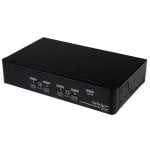
    Dubbele DisplayPort 4K-ondersteuning. Geniet van haarscherpe Ultra HD-resolutie tot 3840 x 2160 pixels bij 60Hz op twee schermen. Ideaal voor grafisch ontwerp, videobewerking en veeleisende werkstations waar beeldkwaliteit essentieel is.

    Naadloze bediening van twee computers. Schakel snel tussen twee DisplayPort-systemen met één set toetsenbord, muis en dubbele monitoren. Perfect voor multitaskers, IT-professionals en content creators die efficiënt willen werken zonder kabels te verwisselen.

    Volledige multimedia-integratie. Dankzij aparte 3,5mm audio- en microfooningangen deel je analoog geluid tussen beide computers. Wissel niet alleen beeld, maar ook audio en USB-randapparatuur automatisch mee voor een complete workflow.

    Geavanceerde USB-hubfunctionaliteit. De geïntegreerde USB-hub (2 poorten) maakt het delen van randapparatuur zoals printers, opslag of webcams eenvoudig. Je hoeft je apparaten niet steeds opnieuw te koppelen; alles volgt automatisch de actieve computer.

    Gebruiksvriendelijk en universeel inzetbaar. Bedien de switch via drukknop of sneltoetsen. Compatibel met Windows, macOS, Linux en andere besturingssystemen. Geschikt voor elke professionele omgeving waar betrouwbaarheid en snelheid vereist zijn.

    Wil je moeiteloos schakelen tussen systemen zonder concessies te doen aan beeld, geluid of randapparatuur? Kies dan voor deze Startech KVM Switch en ervaar het verschil in workflow en comfort.

    Specificaties KVM Switch Startech 2 Poorten DisplayPort 4K 60Hz

    SpecificatieDetail
    Aantal computers2
    Video-uitgang2x DisplayPort, 4K Ultra HD tot 60Hz
    ConsolepoortenDisplayPort, USB-A, 3,5mm audio/mic
    USB-hub2 poorten (USB-A)
    Audio-ondersteuningJa, 3x hoofdtelefoon, 3x microfoon
    BedieningDrukknop, sneltoetsen
    LED-indicatorenJa
    Afmetingen161 x 100 x 57,5 mm
    Gewicht734 g
    Voeding100-240 V AC, 12 V DC adapter
    CertificeringenCE, FCC, REACH, TAA, RoHS
    CompatibiliteitWindows, macOS, Linux
    EthernetNee
    Bedrijfstemperatuur0 - 40 °C
    Inhoud verpakkingHandleiding, rubberen voetjes

    FAQs - KVM Switch Startech 2 Poorten DisplayPort 4K 60Hz

    1. Ondersteunt deze KVM Switch dubbele monitoropstellingen?
    Ja, beide computers kunnen via twee DisplayPort-aansluitingen elk twee monitoren aansturen met 4K-resolutie.

    2. Kan ik USB-randapparatuur zoals printers of webcams delen?
    Ja, de geïntegreerde USB-hub maakt het mogelijk om randapparaten automatisch te delen tussen beide computers zonder opnieuw te koppelen.

    3. Is deze KVM Switch compatibel met zowel Windows als macOS?
    Ja, het apparaat werkt met Windows, macOS, Linux en andere besturingssystemen die DisplayPort en USB ondersteunen.

    4. Hoe schakel ik tussen de aangesloten computers?
    Je kunt eenvoudig wisselen via de fysieke drukknop op het apparaat of via programmeerbare sneltoetsen op je toetsenbord.

    Productveiligheid

    Reviews

    3.5
    20 Reviews
    100%
    Bevelen aan20 Aanbevelingen
    • 5
      6
    • 4
      5
    • 3
      4
    • 2
      4
    • 1
      1

    Review schrijven

    Kost maar een minuut en helpt anderen kiezen.

    Gebruikersreviews

    Totaal 20 reviews

    Uit andere landen

    J
    JavierD
    Uitgelichte beoordeling
    5 jaar geleden
    Todo bien excepto la conmutación de teclado. Con un teclado profesional que necesita mas corriente el equipo conmutador no da suficiente alimentación
    Pluspunten
    • Ninguno
    Minpunten
    • Conmutador teclado
    C
    Chuck
    6 jaar geleden
    Works with most recent graphics & 4k Purchased almost a year ago, still working well. Good value to get full 4K/display port connectivity. I'm fairly hard on these boxes, constantly moving or re-configuring them. Many have had connectors fail, so this one gets 2 thumbs up. No lag or video degr...
    Oorspronkelijk gepubliceerd op Startech
    C
    Corey
    5 jaar geleden
    Terrible function I am not happy, it does not support over 60hz on any rez. The customer support did not seem to care. Trash quality product.
    Oorspronkelijk gepubliceerd op Startech
    a
    abccom
    5 jaar geleden
    Display section works well. USB section poor. Installed many Startech KVM's. Unfortunately they haven't updated the USB section to keep with the times. Please add USB-C support. Won't detect AV devices that connect over USB, even though it's already installed on the PC. I have to connect two ...
    Oorspronkelijk gepubliceerd op Startech
    T
    Tinjaw
    6 jaar geleden
    No EDID support so lots of flickering I wish I didn't buy this device. Everytime I switch between my Mac and PC (which is very often during my day) I have to wait 3-5 seconds while the displays readjust and flicker like crazy. Wish I hadn't waffled for so long and just returned the thing.
    Oorspronkelijk gepubliceerd op Startech
    c
    chandlersmirks
    6 jaar geleden
    Great product but only USB 2.0 This is a very reliable KVM. However, given that I use high speed gaming mice, and a capture card, I need USB 3.0. The USB bandwidth offered on the KVM is limited to only a basic wired mouse and keyboard.
    Oorspronkelijk gepubliceerd op Startech
    M
    MFrank
    5 jaar geleden
    Works well, great warranty support I've had this over a year. works very reliably, does what it needs to do. Occasionally one of my computers does not recognize the mouse and keyboard, switching back and forth rectifies that quickly. Had a thunderstorm induced power event after a year of operatio...
    Oorspronkelijk gepubliceerd op Startech
    J
    Jimhuber1
    9 jaar geleden
    An Excellent 2-Port KVM Switch I have been in the technology business for over 35 years and for the past 20+ years I have been asked to provide unbiased reviews of various products from both the AV and IT world. In review of this product I have found that this product provides true 4K video from ...
    Oorspronkelijk gepubliceerd op Startech
    D
    DPoz
    9 jaar geleden
    Dual monitor support is great to have I have a two monitor workspace set up and I have both a workstation and server running off them through a KVM that does not support dual monitors. I was only able to run my workstation using two monitors by running one monitor to the KVM unit and one directly ...
    Oorspronkelijk gepubliceerd op Startech
    L
    Leon
    4 jaar geleden
    doesnt work with any mouse and keyboard works great with 2 screens attached. but no matter what keyboard and mouse I connect to it, it just doesn't work. they sometimes work for a few seconds and then stop
    Oorspronkelijk gepubliceerd op Startech
    a
    adamchicago
    5 jaar geleden
    Wish It Had Faster Refresh For 2K/Lower Resolution Need to share two monitors with a fast 144hz refresh gaming PC and a standard work laptop in this new era of work-from-home...wish this KVM Switch had a higher refresh rate, if not at 4K at least for 2K and lower resolutions...will keep looking.
    Oorspronkelijk gepubliceerd op Startech
    w
    whatadrag
    5 jaar geleden
    Too many quirks for me I had my boss order this for me for switching between my workstation and laptop. Unfortunately this was only a few short weeks before COVID restrictions went in place and it lay abandoned on my desk (along with my workstation). DP was a fantastic equalizer but I found it ver...
    Oorspronkelijk gepubliceerd op Startech
    A
    Alice
    4 jaar geleden
    Keyboard+mouse are working with 2 screens! Make sure to actually use the usb output that matches the computer your are testing your mouse+keyboard with. I had the keyboard+mouse not working like some mentioned in other comments/reviews. I contacted the support team which helped me make it work cor...
    Oorspronkelijk gepubliceerd op Startech
    N
    Nick426
    9 jaar geleden
    High quality 4k KVM! Video and audio quality through the switch are up to par. Switching is smooth and quick (faster than my old HDMI switch!), and the box is nice and compact. Be SURE to READ the instruction booklet before you buy this (pay attention to the keyboard port and note about gaming ...
    Oorspronkelijk gepubliceerd op Startech
    M
    Mike1000
    6 jaar geleden
    Seems to work great so far, but USB 2.0 Didn't realize I had a USB 3.0 device in my chain (webcam), but it's sad thinking now that a decade after USB 3 is introduced, that this is still only a USB 2.0 hub. Otherwise, thinking this would be great.
    Oorspronkelijk gepubliceerd op Startech
    Geverifieerde review
    Ons label "geverifieerde review" garandeert dat deze review afkomstig is van dezelfde gebruiker die het product op onze website heeft gekocht. We verifiëren de echtheid van aankopen en de bijbehorende reviews, zodat reviews met dit label nauwkeurig en betrouwbaar zijn.
    Meer reviews laden

    Vragen en antwoorden

    Er zijn momenteel geen vragen. Wees de eerste!